Runtiva survivor pools · Commissioner guide
Survivor Pool Commissioner Guide
Create, invite, and run a free survivor pool for your group. Set the rules once. Runtiva grades every pick, sends every reminder, and keeps the standings.
Create a group
Set up the pool
Invite people
Run each round
Finish the season
How a Runtiva survivor pool works
One pick a round
Every round (an NFL week, an MLB week, a cricket match day) each entry picks one team to win. Win and you advance. Lose and you are out, unless the pool gives strikes.
Each team once
By default a team can be used once all season, so the teams people burn in September are the ones they want in December.
Last one standing
Everyone still alive after the final round shares the crown. There are no tiebreakers and no prizes. Bragging rights only.
Runtiva survivor pools are free to play. There is no entry fee, no prize, and no buy-in of any kind. Runtiva does not support or track money collected on the side, and the app says so on the review screen. Keep it friendly.
You are the commissioner because you own the group the pool lives in. You choose the rules, you invite people, and you hold two tools nobody else has: reviving an eliminated entry (if your rules allow it) and ending the pool. Everything else is automatic: rounds open and lock on the real schedule, picks are graded from official results, standings update themselves, reminders go out, and the group chat gets a card for every round, elimination, and champion.
Why run one
No spreadsheet, no chasing results, no disputes about who picked what. The app is the record. You get the organizer badge, a group that keeps working for weekly contests, and the best seat in the house for the trash talk.
Two kinds of pool
A private pool lives in your group, invite-only, with your rules. A public flagship pool is run by Runtiva for a whole league season. This guide is about the private kind.
What you can't change later
Rules freeze when the starting round locks. After that you can rename the pool, revive entries inside your revive window, and end the pool early. Nothing else.
Before you start
What you need
- The Runtiva app, signed in, with your age and location verified (the app does this at signup). Survivor pools are free to play wherever Runtiva is available; the app confirms your state at signup.
- A group you own. If you are only a member of a group, ask its organizer to create the pool, or start your own group.
- A season with an upcoming round at least 24 hours away. The wizard only lists sports that qualify right now.
- Somewhere to reach people: a group text, an office channel, a family thread. The invite is one link.
Decide these rules before you open the wizard
Every choice below is set at creation and frozen when the first round locks. Pick them with your group in mind, not with the wizard open.
| Decision | Options | Our recommendation |
|---|---|---|
| Style | Classic (one life) or Strikes (1 to 3 wrong picks allowed) | Classic for 10 to 30 people. Strikes (2) for bigger or more casual groups, so nobody is out in Week 1. |
| Manual revive | Off, or open through a round you choose, with a per-entry limit | On through about the first third of the season, 1 revive per entry. It keeps early-week casualties engaged. |
| Entries per person | 1 to 5 | 1 for office pools. 2 or 3 for a competitive friend group that wants to hedge. |
| Team reuse | Never, free again after 4 rounds, or unlimited | Never. It is the whole strategy. Use 'free after 4' only for seasons longer than the team count. |
| Missed pick | Eliminated, pick the favourite, random, reuse last | Eliminated for serious pools. 'Pick the favourite' for casual pools where people forget. |
| Picks close | At last kickoff (default) or at first kickoff | Last kickoff for forgiving pools, but say it out loud: late pickers see early results. First kickoff for strict pools. |
| Multi-pick weeks | Any weeks you choose need 2, 3, or 4 teams | Two or three late-season weeks (for example Weeks 12 and 14) to thin a pool that will not die. |
| Entry closes | At first kickoff, or 24 or 48 hours before | First kickoff, unless you want a hard sign-up deadline to chase people against. |
| Total wipeout | Round is void (default) or the season ends and everyone left shares it | Leave it off. A void round is fairer than a sudden ending. |
Style
Classic (one life) or Strikes (1 to 3 wrong picks allowed)
Classic for 10 to 30 people. Strikes (2) for bigger or more casual groups, so nobody is out in Week 1.
Manual revive
Off, or open through a round you choose, with a per-entry limit
On through about the first third of the season, 1 revive per entry. It keeps early-week casualties engaged.
Entries per person
1 to 5
1 for office pools. 2 or 3 for a competitive friend group that wants to hedge.
Team reuse
Never, free again after 4 rounds, or unlimited
Never. It is the whole strategy. Use 'free after 4' only for seasons longer than the team count.
Missed pick
Eliminated, pick the favourite, random, reuse last
Eliminated for serious pools. 'Pick the favourite' for casual pools where people forget.
Picks close
At last kickoff (default) or at first kickoff
Last kickoff for forgiving pools, but say it out loud: late pickers see early results. First kickoff for strict pools.
Multi-pick weeks
Any weeks you choose need 2, 3, or 4 teams
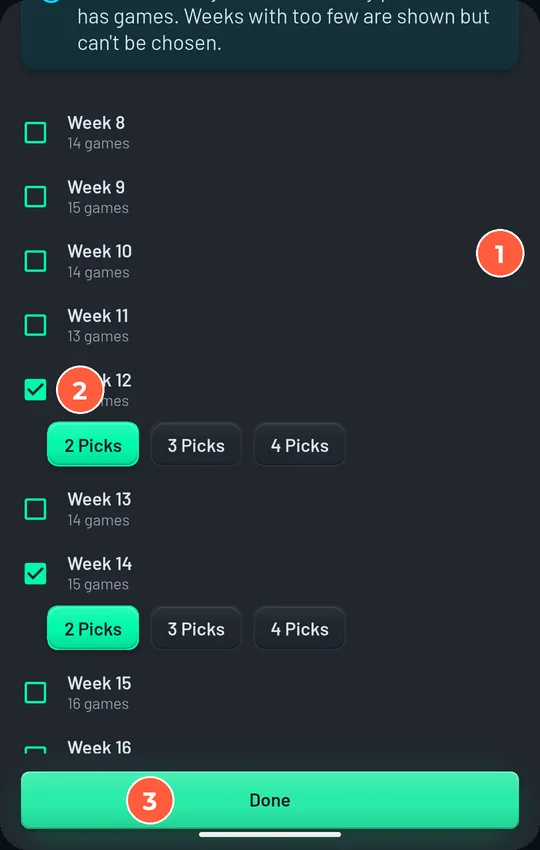
Two or three late-season weeks (for example Weeks 12 and 14) to thin a pool that will not die.
Entry closes
At first kickoff, or 24 or 48 hours before
First kickoff, unless you want a hard sign-up deadline to chase people against.
Total wipeout
Round is void (default) or the season ends and everyone left shares it
Leave it off. A void round is fairer than a sudden ending.
- Sport and season chosen
- Starting round chosen (the wizard suggests the earliest round at least 24 hours out)
- Style, strikes, and revive window decided
- Entries per person decided
- Missed-pick policy and picks-close rule decided, and you can explain both in one sentence
- Pool name (it will be shown in capitals)
- Invite list ready
Season timeline
- 2 weeks before kickoffCreate the group and the pool. Post the rules summary and the invite link.
- 1 week beforeRe-share the link. Check the group's Members tab and the pool's Who's in list against your invite list.
- 3 days beforeChase anyone who joined the group but not the pool. Remind everyone that entry closes at first kickoff.
- Kickoff weekSay when picks lock: each pick locks when its own game starts. Point out the Thursday or Wednesday game.
- Every roundWatch the chat cards. Nudge anyone the standings show as not picked. Revive if your rules allow and you choose to.
- Final roundEveryone still alive shares the crown. Post a recap in the chat. Take a screenshot of the standings.
Create the group
If you already run a group for weekly contests, skip this section and create the pool inside it. One group can run a survivor pool and weekly contests side by side.
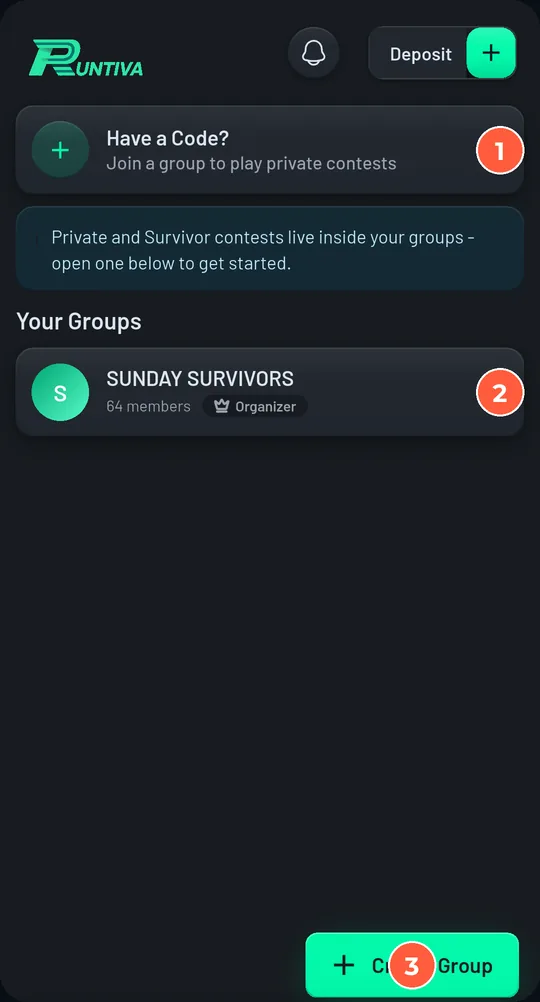
- 1
Open the Groups tab and tap Create Group.
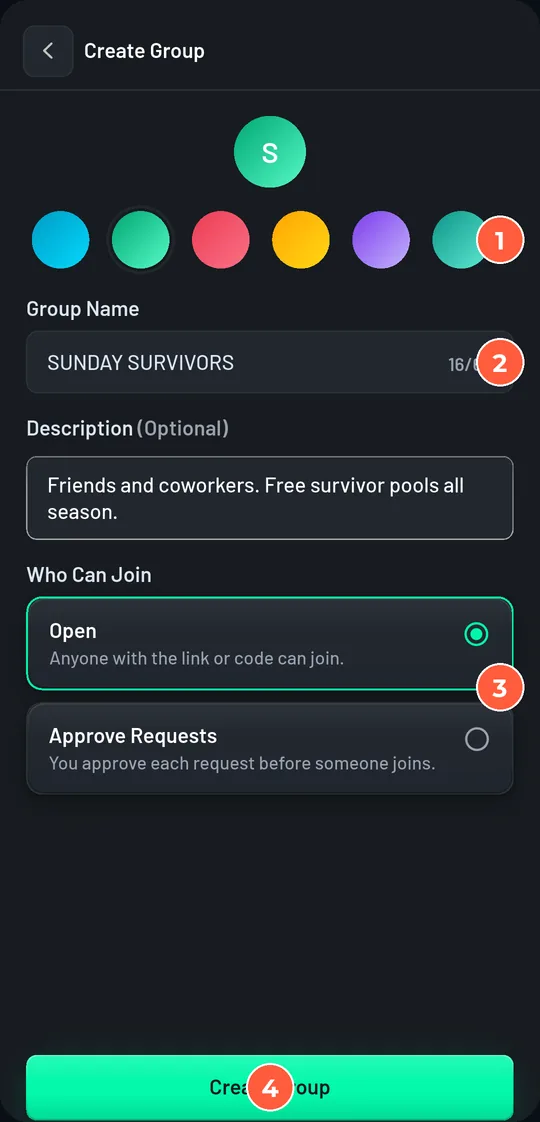
- 2
Pick a colour, type a Group Name, and add a one-line description. Leave Who Can Join on Open so an invite link or code is enough; choose Gated only if you want to approve each request.
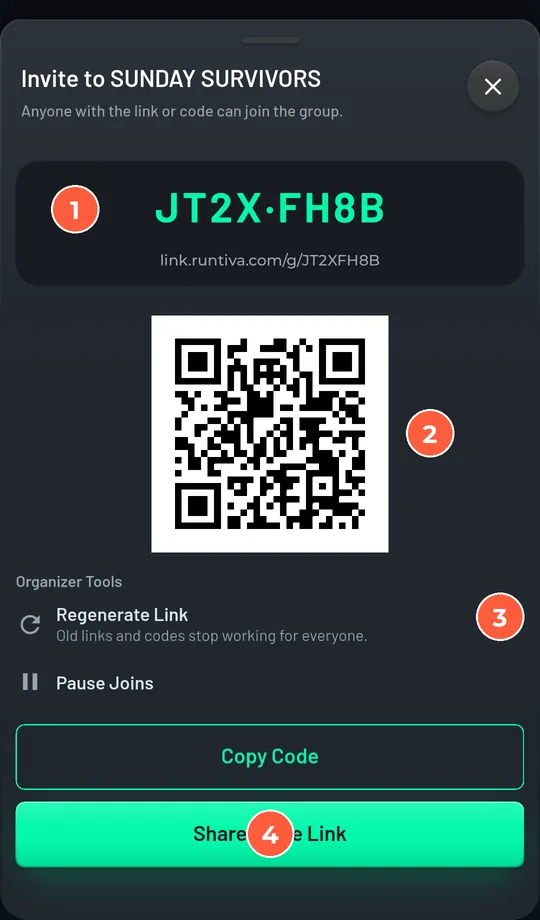
- 3
The invite sheet opens automatically with your group code, a link, and a QR code. Tap Share Invite Link to send it now, or close it and come back any time from the Invite button.
Create the pool
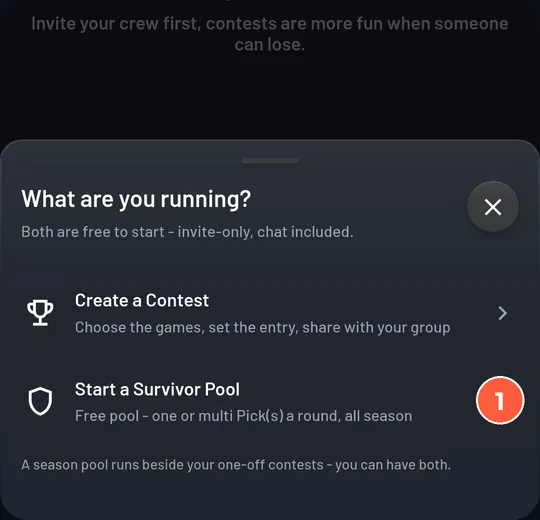
- 1
On the group's Contests tab tap Create Contest, then choose Start a Survivor Pool.
- 2
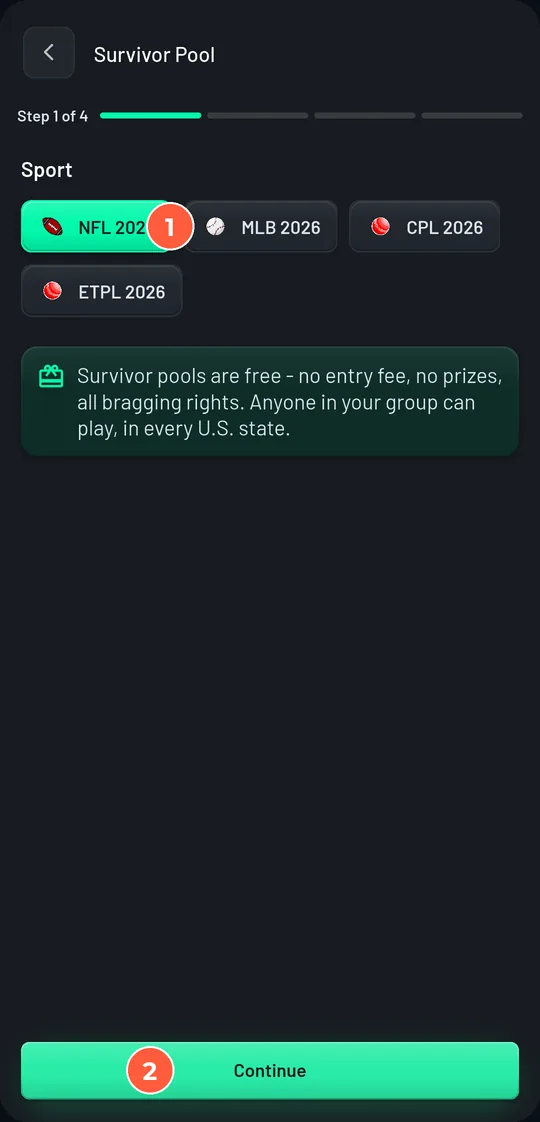
Step 1, Sport. Tap the season you want. Only seasons with a round at least 24 hours from locking are listed. Tap Continue.
- 3
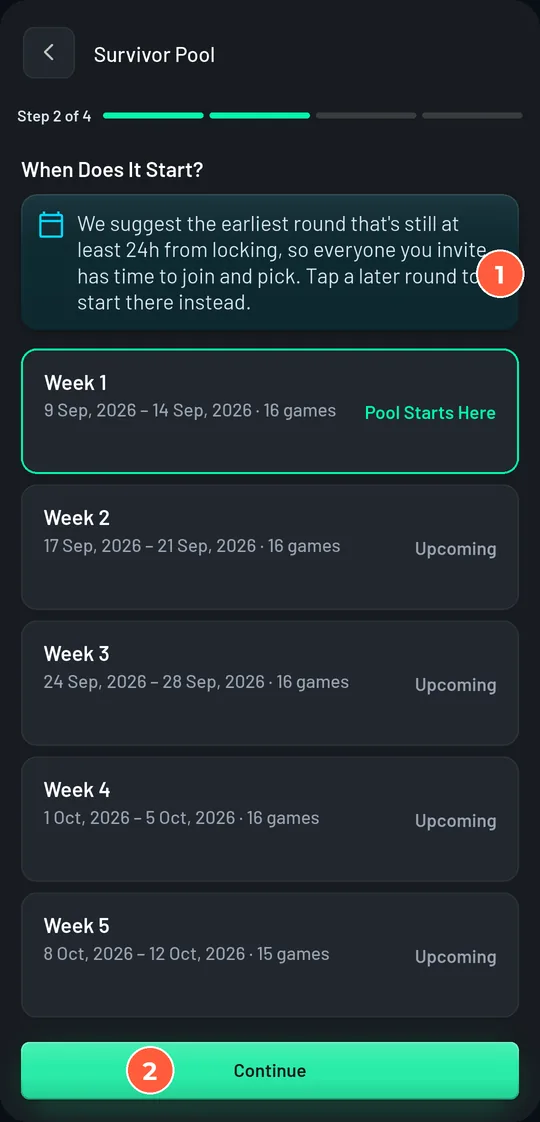
Step 2, When does it start? The wizard pre-selects the earliest round that is still at least 24 hours out. Tap a later round to start there instead; you cannot start earlier. For sports played most days you also choose how many game days make one round.
- 4
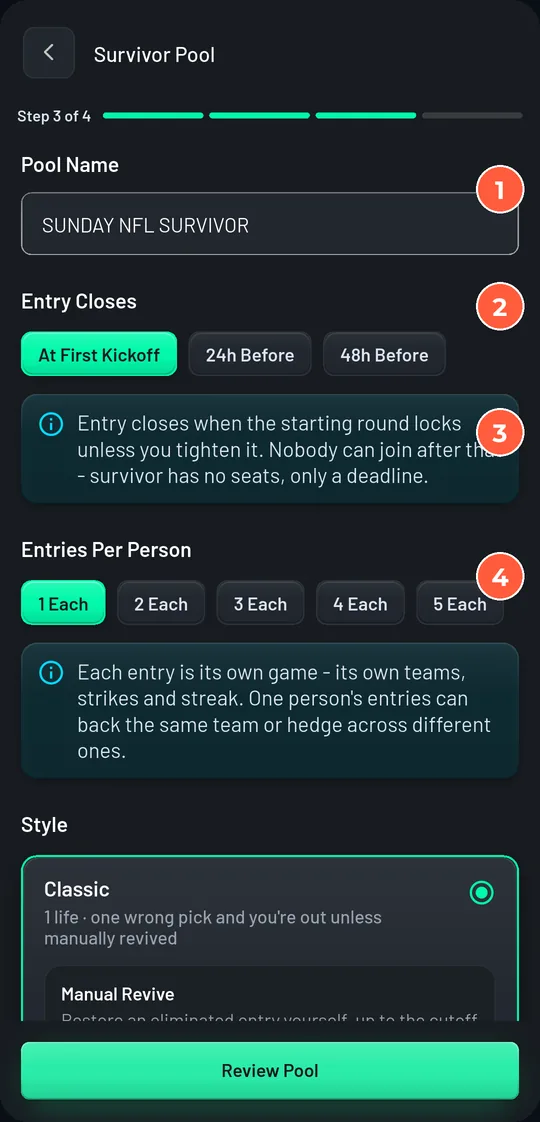
Step 3, Rules. Type the Pool Name (it is shown in capitals), then work down the settings. The next section explains each one.
- 5
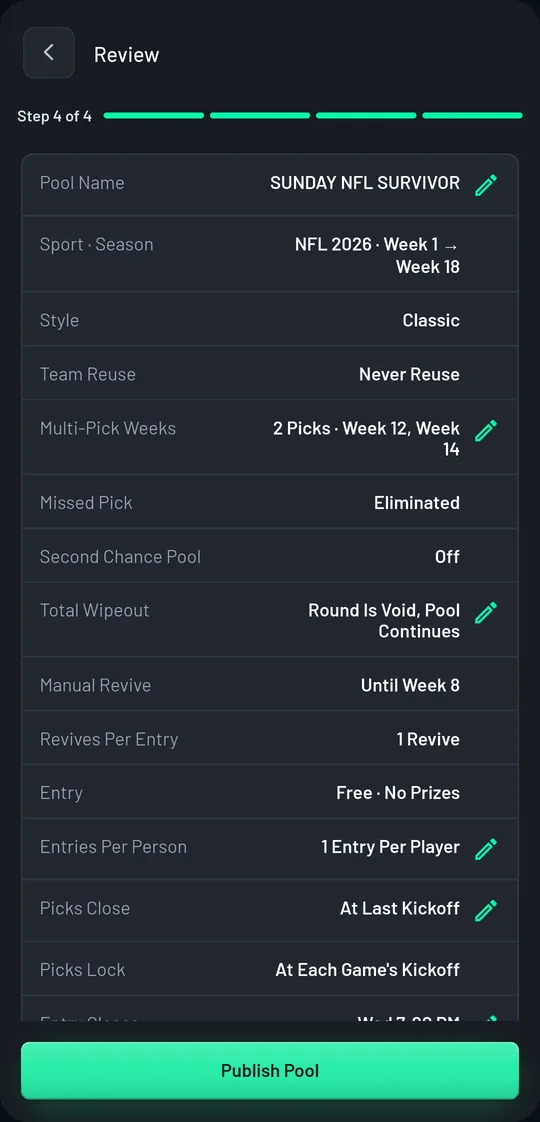
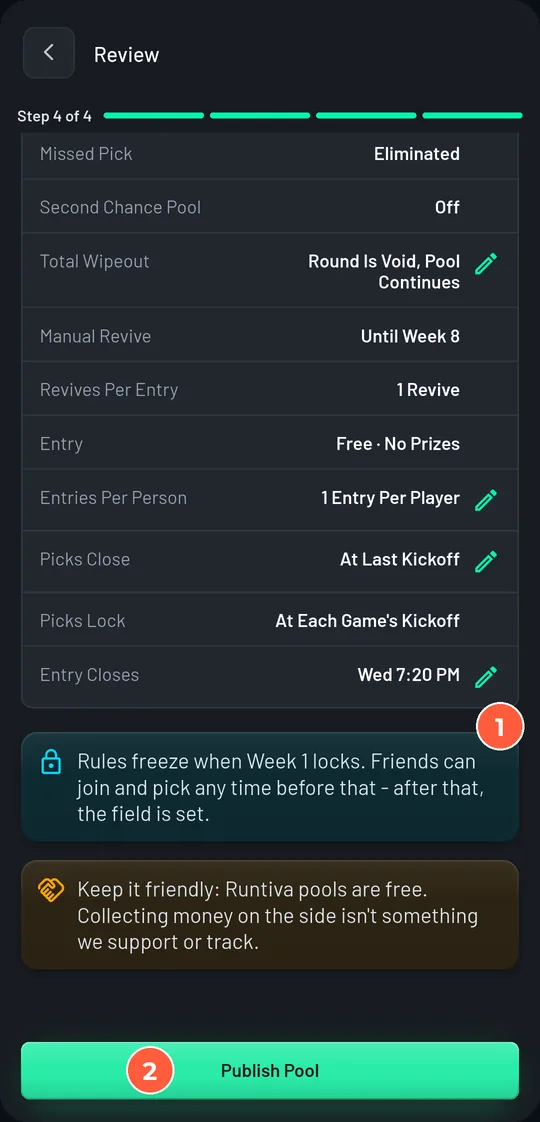
Step 4, Review. Read the summary once more. Two footers matter: rules freeze when the starting round locks, and Runtiva pools are free. Tap Publish Pool.
Every setting, explained
Entry and entries
| Setting | What it does | Default | Change it when |
|---|---|---|---|
| Entry closes | When joining stops. Survivor has no seat limit, only a deadline. | At the starting round's first kickoff | You want a sign-up cutoff a day or two before kickoff to chase people against. |
| Entries per person | How many separate entries one person may hold. Each entry has its own teams, strikes, and streak. | 1 | A competitive group wants to hedge. 2 or 3 is plenty; 5 is the maximum. |
Entry closes
When joining stops. Survivor has no seat limit, only a deadline.
At the starting round's first kickoff
You want a sign-up cutoff a day or two before kickoff to chase people against.
Entries per person
How many separate entries one person may hold. Each entry has its own teams, strikes, and streak.
1
A competitive group wants to hedge. 2 or 3 is plenty; 5 is the maximum.
Lives
| Setting | What it does | Default | Change it when |
|---|---|---|---|
| Style: Classic | One wrong pick and the entry is out, unless you revive it. | Classic | Keep it for groups under about 30 who want the pure version. |
| Style: Strikes | Each wrong pick costs a strike. Run out and the entry is out. 1 to 3 strikes. | 2 strikes when Strikes is chosen | Large or casual groups, so a Week 1 upset does not empty the pool. |
| Strikes valid through | After the round you choose, strikes stop absorbing losses: one wrong pick ends the run even with strikes in hand. | All season | You want a forgiving start and a sudden-death finish. |
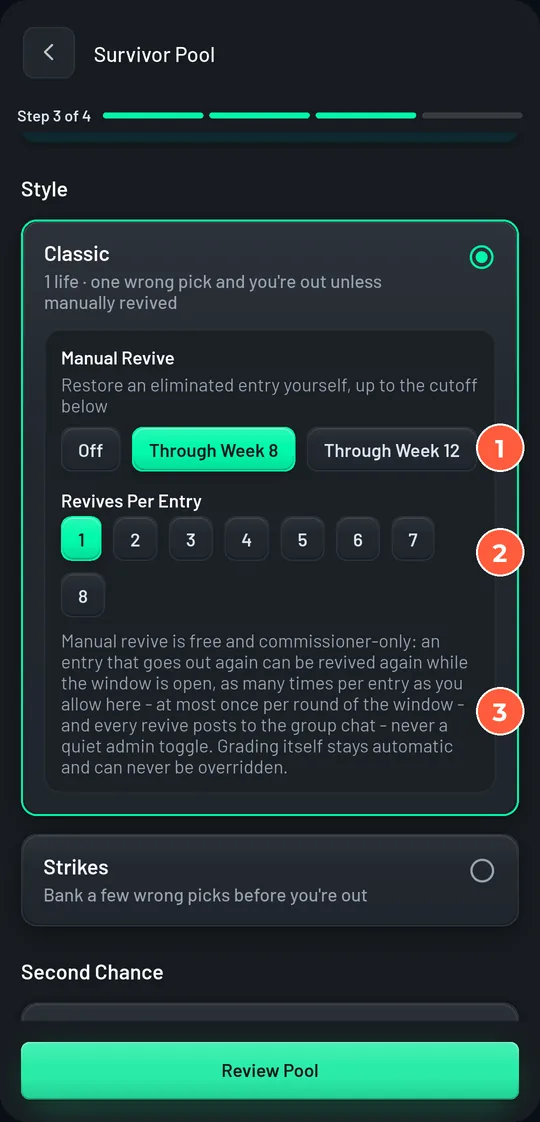
| Manual revive | Lets you restore an eliminated entry, in any round up to the cutoff you choose. Every revive posts to the group chat with your name on it. | Off | Almost always turn it on. Through Week 6 to 8 of an NFL season is typical. |
| Revives per entry | How many times one entry can come back, at most once per round of the window. | 1 | Very casual pools with a long revive window. |
Style: Classic
One wrong pick and the entry is out, unless you revive it.
Classic
Keep it for groups under about 30 who want the pure version.
Style: Strikes
Each wrong pick costs a strike. Run out and the entry is out. 1 to 3 strikes.
2 strikes when Strikes is chosen
Large or casual groups, so a Week 1 upset does not empty the pool.
Strikes valid through
After the round you choose, strikes stop absorbing losses: one wrong pick ends the run even with strikes in hand.
All season
You want a forgiving start and a sudden-death finish.
Manual revive
Lets you restore an eliminated entry, in any round up to the cutoff you choose. Every revive posts to the group chat with your name on it.
Off
Almost always turn it on. Through Week 6 to 8 of an NFL season is typical.
Revives per entry
How many times one entry can come back, at most once per round of the window.
1
Very casual pools with a long revive window.
Teams and picks
| Setting | What it does | Default | Change it when |
|---|---|---|---|
| Team reuse | Never: a team is spent once used. Free after 4 rounds: it comes back after a cooldown. Unlimited: no restriction. | Never | The season has more rounds than teams (some daily sports). The wizard will refuse a pool that cannot be completed without reuse. |
| Playoffs | Carries the pool into the knockout bracket. Only offered for seasons that have one. In knockout rounds every team is pickable and picks do not use a team up. | Off | Cricket tournaments with a bracket. Not offered for the NFL regular season. |
| If someone forgets to pick | Eliminated: the missed round counts as a loss. Pick the favourite, Random, Reuse last: the app picks for them from teams they have not used. | Eliminated | Casual pools. Note: the favourite option needs win odds; for cricket it behaves like Random. |
| Picks close | The round's deadline, when a missing pick is resolved. Each individual pick always locks when its own game starts. | At last kickoff | Choose 'At first kickoff' for a strict pool. With 'last kickoff', someone who picks on Sunday night has seen the early results. Say so in your rules post. |
| Multi-pick weeks | Chosen weeks need 2, 3, or 4 different teams, and every one must win. Several losses in one week still cost only one strike. | Off | Late season, to thin a pool that will not die. A week can only demand as many picks as it has games. |
Team reuse
Never: a team is spent once used. Free after 4 rounds: it comes back after a cooldown. Unlimited: no restriction.
Never
The season has more rounds than teams (some daily sports). The wizard will refuse a pool that cannot be completed without reuse.
Playoffs
Carries the pool into the knockout bracket. Only offered for seasons that have one. In knockout rounds every team is pickable and picks do not use a team up.
Off
Cricket tournaments with a bracket. Not offered for the NFL regular season.
If someone forgets to pick
Eliminated: the missed round counts as a loss. Pick the favourite, Random, Reuse last: the app picks for them from teams they have not used.
Eliminated
Casual pools. Note: the favourite option needs win odds; for cricket it behaves like Random.
Picks close
The round's deadline, when a missing pick is resolved. Each individual pick always locks when its own game starts.
At last kickoff
Choose 'At first kickoff' for a strict pool. With 'last kickoff', someone who picks on Sunday night has seen the early results. Say so in your rules post.
Multi-pick weeks
Chosen weeks need 2, 3, or 4 different teams, and every one must win. Several losses in one week still cost only one strike.
Off
Late season, to thin a pool that will not die. A week can only demand as many picks as it has games.
Commissioner tools
| Setting | What it does | Default | Change it when |
|---|---|---|---|
| End the season on a total wipeout | If every entry still alive loses in the same round, the season stops there and they all share the crown. Off means the round is void: nobody goes out, nobody is charged a strike, and the pool continues. | Off | Rarely. A round everyone missed can never end a pool, and the last player standing can never be knocked out, whichever you choose. |
| But not before | The earliest round a wipeout may end the pool. | Any round | You turned the setting on and want to protect the early weeks. |
| Second Chance Pool | Listed in the wizard for a future side pool for eliminated players. Not active this season. | Off | Leave it off. |
End the season on a total wipeout
If every entry still alive loses in the same round, the season stops there and they all share the crown. Off means the round is void: nobody goes out, nobody is charged a strike, and the pool continues.
Off
Rarely. A round everyone missed can never end a pool, and the last player standing can never be knocked out, whichever you choose.
But not before
The earliest round a wipeout may end the pool.
Any round
You turned the setting on and want to protect the early weeks.
Second Chance Pool
Listed in the wizard for a future side pool for eliminated players. Not active this season.
Off
Leave it off.
Rules that are fixed for every pool
- Ties and washouts. A tie, a postponed game, or a game with no result is a push: the entry advances, its streak is unchanged, and the team goes back into its available list.
- Streaks and strikes. A loss breaks the streak even when a strike absorbs it.
- Champions. Everyone still alive after the final round is a champion. No tiebreakers.
- Last one standing. If only one entry is left, it cannot be eliminated. The remaining rounds are a victory lap.
- Privacy. Picks are hidden from other players until each game kicks off. Yours are always visible to you.
- Withdrawing. A player may withdraw before the starting round locks. After that, entries play out.
Invite people
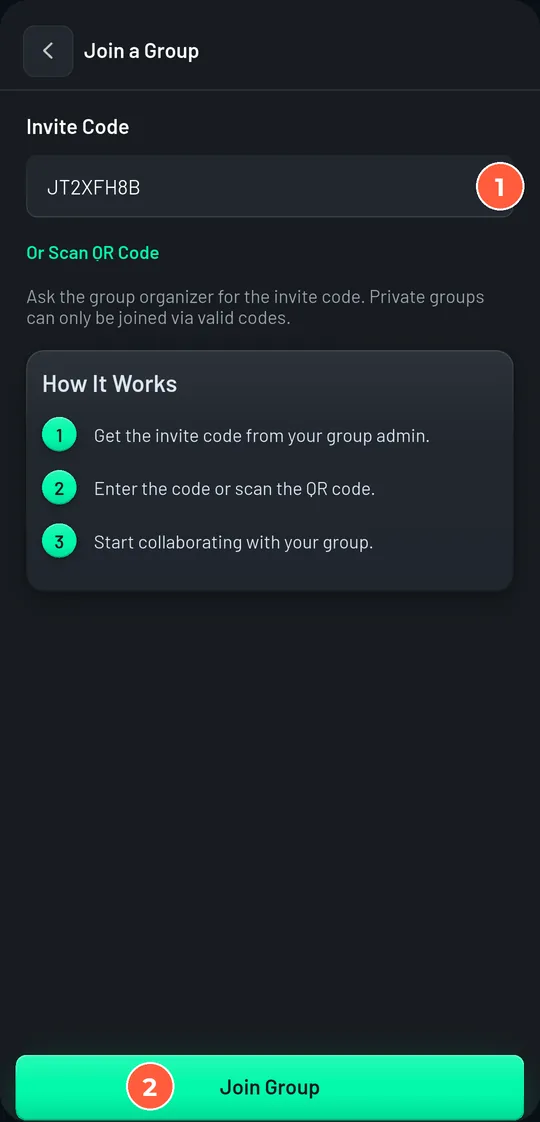
Every invite tool lives on one sheet. It opens automatically when you publish, and any time from the group's Invite button or the pool's Share Pool action.
- 1
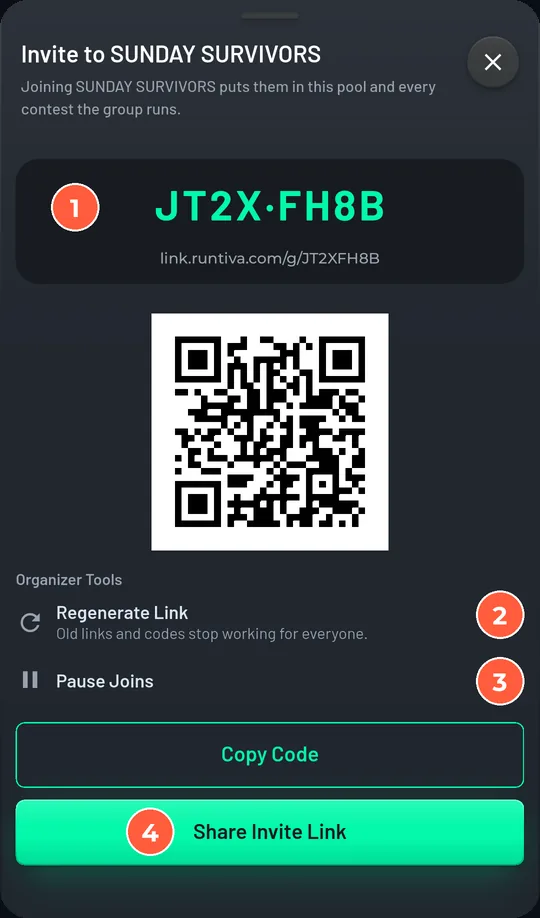
Open the invite sheet. It shows the 8-character group code, the invite link, and a QR code.
- 2
Tap Share Invite Link to send it through any app, or Copy Code to paste it into a message. Print the QR for an office notice board.
- 3
Under Organizer Tools, Regenerate Link retires the old code and link for everyone. Pause Joins closes the door temporarily without changing the code.
What the invitee sees
A message that works
Short, with the three facts people need: it is free, it takes one tap a week, and there is a deadline.
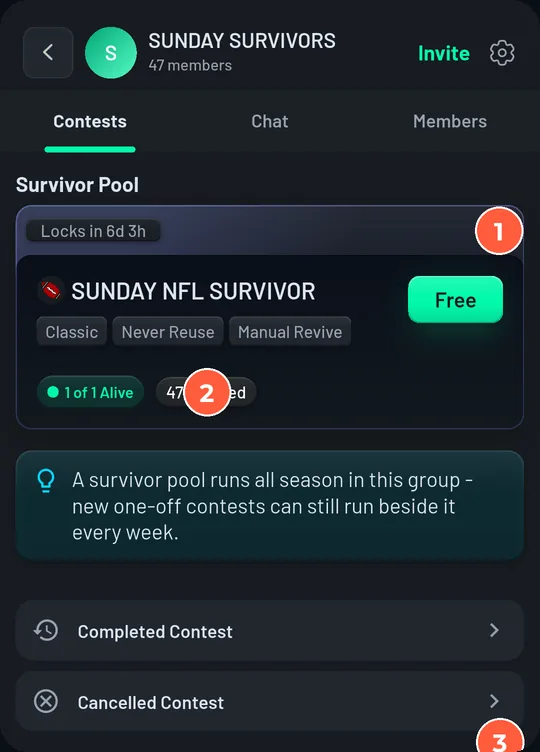
Your pool, before kickoff
- 1
The pool card on the group's Contests tab shows the rule chips, how many have entered, and when the first round locks. The ⋮ menu on the card is the same Pool Actions menu you get inside the pool.
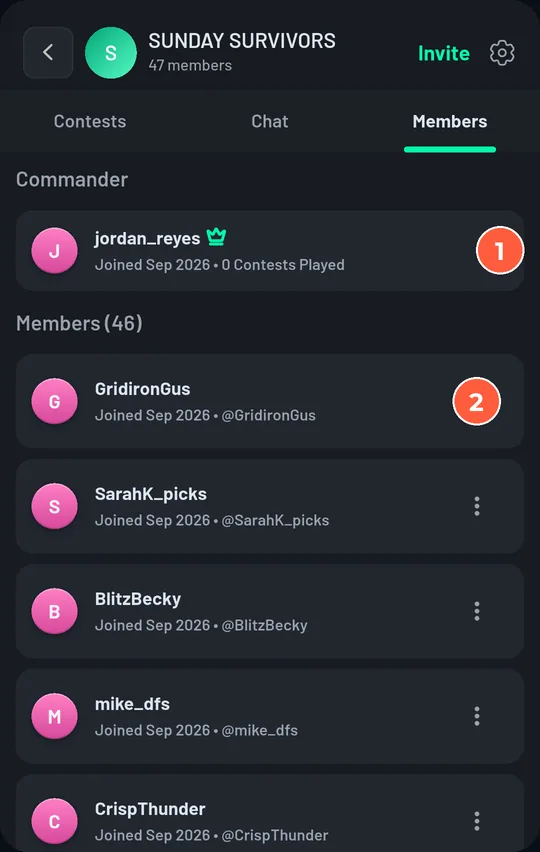
- 2
The Members tab lists everyone in the group. You are the Commander. The ⋮ next to a member holds member options.
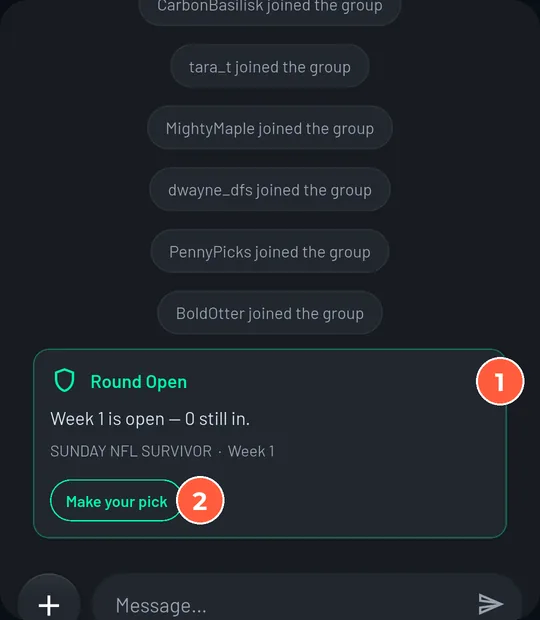
- 3
The Chat tab is where the pool talks. Runtiva posts a card when a round opens, when it locks, when people go out, when you revive someone, and when a champion is crowned.
- 4
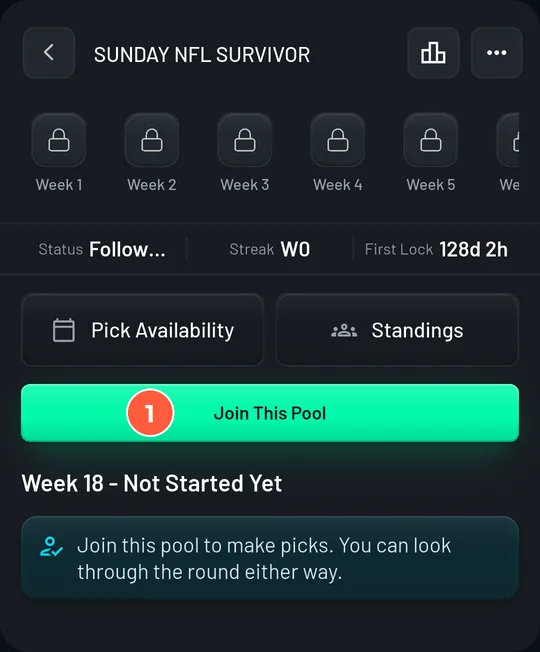
Join your own pool. Open it and tap Join This Pool. Commissioners play too, and your name on the standings is what makes the pool feel real.
Pool Actions: your commissioner menu
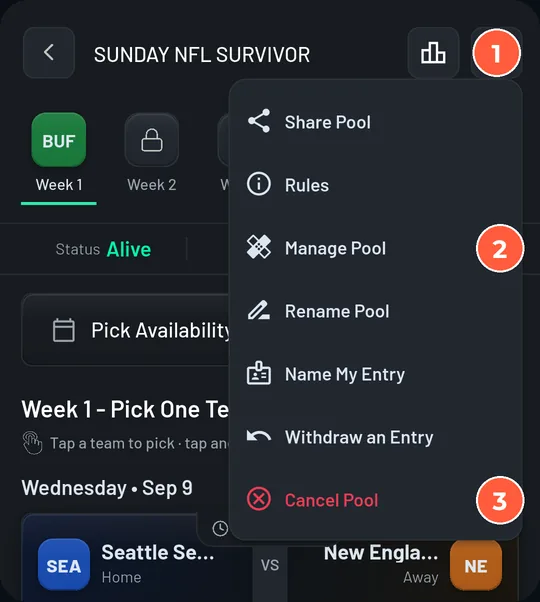
| Action | Who sees it | What it does |
|---|---|---|
| Share Pool | Everyone | Opens the invite sheet for the pool's group. |
| Rules | Everyone | The frozen rules sheet. Send people here when they ask. |
| Manage Pool | You, if the pool has a revive window | Revive eliminated entries. See the next section. |
| Rename Pool | You, while the pool is open or running | Changes the name only. Rules stay locked. |
| Name My Entry | Every entrant | A 2 to 20 character entry name, and the choice to hide your identity from other players. You still see who everyone is. |
| Withdraw an Entry | Entrants, until the starting round locks | The entry leaves the pool and the standings. It cannot rejoin once the pool has started. |
| Cancel Pool | You, until the starting round locks | Closes the pool for everyone. You must give a reason, and everyone sees it. |
| End Pool Early | You, once the pool has started | Stops every run in progress and crowns nobody. Cannot be undone. |
Share Pool
Everyone
Opens the invite sheet for the pool's group.
Rules
Everyone
The frozen rules sheet. Send people here when they ask.
Manage Pool
You, if the pool has a revive window
Revive eliminated entries. See the next section.
Rename Pool
You, while the pool is open or running
Changes the name only. Rules stay locked.
Name My Entry
Every entrant
A 2 to 20 character entry name, and the choice to hide your identity from other players. You still see who everyone is.
Withdraw an Entry
Entrants, until the starting round locks
The entry leaves the pool and the standings. It cannot rejoin once the pool has started.
Cancel Pool
You, until the starting round locks
Closes the pool for everyone. You must give a reason, and everyone sees it.
End Pool Early
You, once the pool has started
Stops every run in progress and crowns nobody. Cannot be undone.
- 1
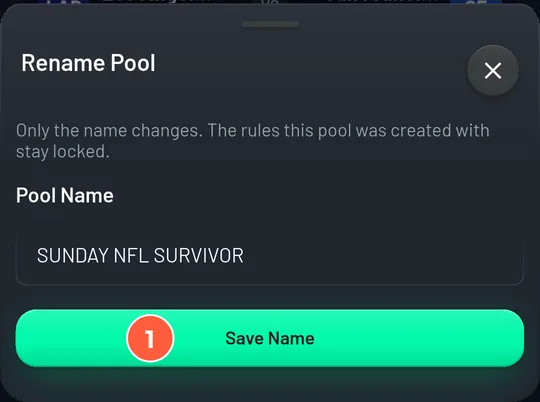
Rename when the group settles on a better name. Tap Rename Pool, edit, Save Name. Nothing else changes.
- 2
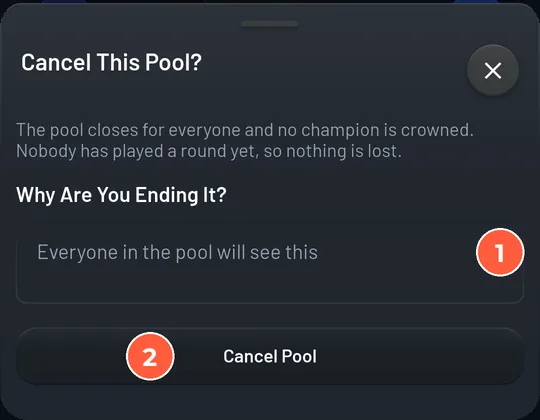
Cancel only before the first lock, and only with a reason. Type why in the box (everyone in the pool will read it) and tap Cancel Pool. Once the pool has started the same slot reads End Pool Early, and it is permanent.
Run each round
What happens automatically
- Round opens. The next round's games appear in the pick centre and the chat gets a Round Open card with a Make your pick button.
- Reminders. Players who have not picked get a push 48, 24, and 3 hours before the round closes (12 and 3 hours for daily sports). Picking removes them from the list.
- Locks. Each pick locks when its game starts. The round closes at the last kickoff (or the first, if you chose that), and the missed-pick rule is applied to anyone without a pick.
- Results. Picks are graded from official results as each game finishes. Standings update, strikes are charged, eliminations are posted to the chat.
- Ties and postponements are pushes: the entry advances and the team returns to its list.
Your weekly five minutes
- 1
Open Standings. The banner at the top says how many alive entries have picked this round.
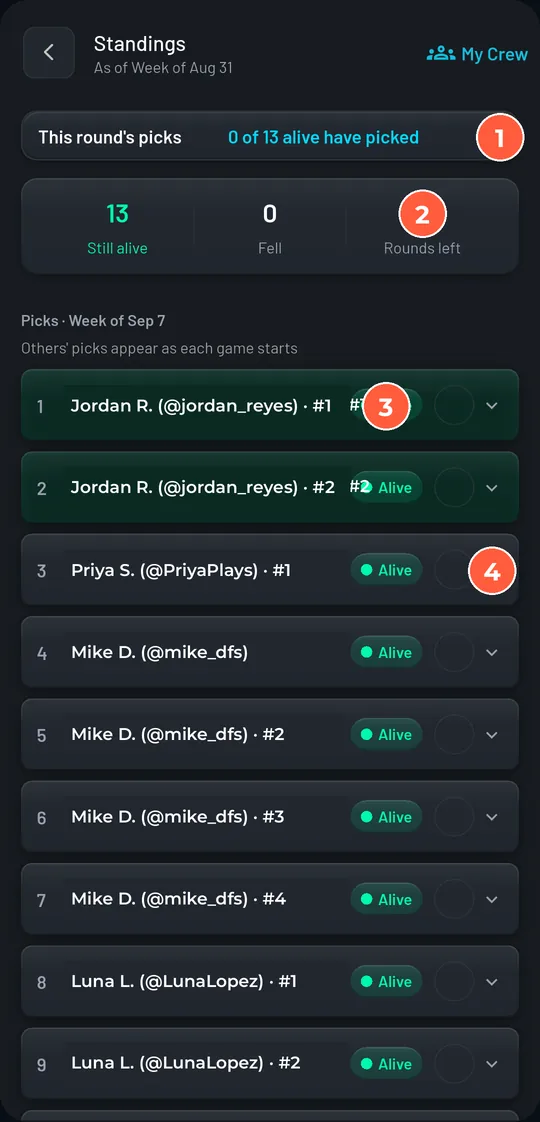
- 2
Tap any row to expand its pick history. Locked picks show the team and the score; unlocked picks stay hidden until kickoff, for other people's entries as well as yours.
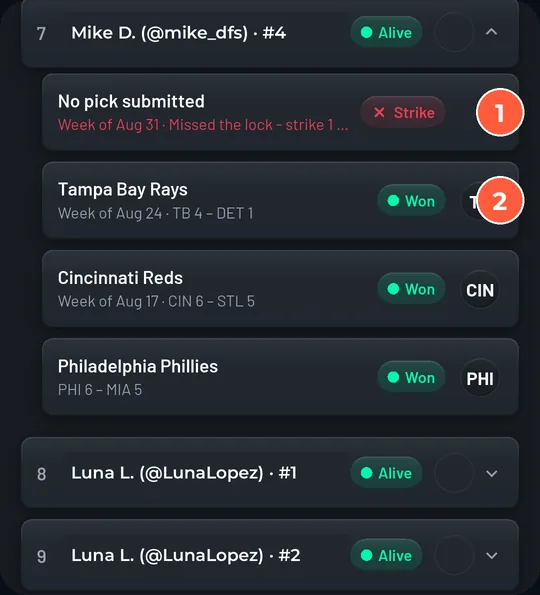
- 3
Read the chat cards after the round grades. A Result Corrected card means an official result changed and the round was regraded; nothing for you to do.
Revive an entry
Manual revive is only available if you turned it on when you created the pool. The window closes after the round you chose, and each entry can come back at most the number of times you set.
- 1
Open the pool, tap ⋯, then Manage Pool. The header shows how many entries are out and whether the revive window is open.
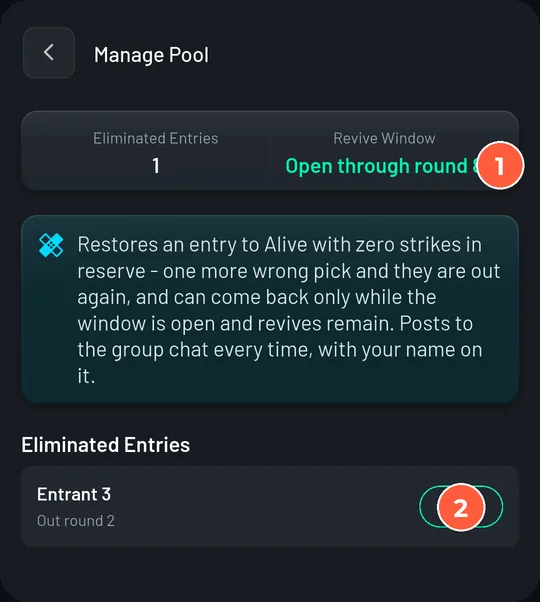
- 2
Tap Revive next to the entry. Read the sheet: the entry returns at the next round that has not locked, with 0 strikes in reserve, and its burned teams stay burned.
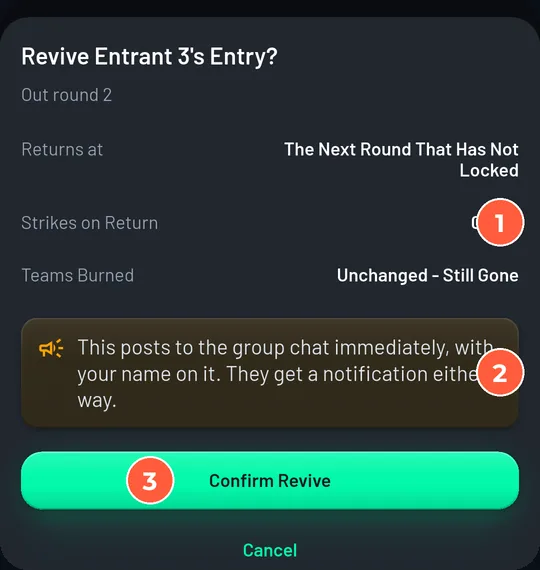
- 3
Tap Confirm Revive. A card is posted to the group chat immediately with your name on it, and the player gets a notification.
When something goes wrong
| Situation | What the app does | What you say |
|---|---|---|
| Someone forgot to pick | Applies your missed-pick rule at the round's close. Under 'Eliminated' the round counts as a loss. | Point to the rules sheet. The reminders went out. If you have a revive window and a policy, apply it evenly. |
| A game was postponed, abandoned, or tied | Push. The entry advances, streak unchanged, team returned. | Nothing to rule on. The push rule is the same in every pool. |
| Everyone alive lost the same round | The round is void: nobody goes out, no strikes charged (unless you chose to end the season on a wipeout). | Announce it. It is the fairest outcome and it is automatic. |
| An official result changed after grading | Runtiva regrades the pool and posts a Result Corrected card. | Nothing. Survivor follows the official result, never a commissioner override. |
| Someone joined the group but is not in the pool | Nothing. Group membership and pool entry are separate. | Before the first lock: tell them to open the pool and tap Join. After: they can follow, but not play. |
| Someone wants out | Withdraw is available until the starting round locks. After that entries play out. | Before the lock: Pool Actions, then Withdraw an Entry. After: they can stop picking; the entry will fall on its own. |
| A link leaked | Regenerate Link retires the old code and link. Pause Joins closes the door. | Regenerate, then re-share the new link with the people you want. |
| A rule was set wrong | Rules cannot be edited after publishing. | Before the first lock: cancel and recreate. After: play it out and note it for next season. |
| Someone hides their identity | Their entry name shows to other players. You and Runtiva support still see who they are. | Nothing. It is a player's choice, and you can always see through it. |
Someone forgot to pick
Applies your missed-pick rule at the round's close. Under 'Eliminated' the round counts as a loss.
Point to the rules sheet. The reminders went out. If you have a revive window and a policy, apply it evenly.
A game was postponed, abandoned, or tied
Push. The entry advances, streak unchanged, team returned.
Nothing to rule on. The push rule is the same in every pool.
Everyone alive lost the same round
The round is void: nobody goes out, no strikes charged (unless you chose to end the season on a wipeout).
Announce it. It is the fairest outcome and it is automatic.
An official result changed after grading
Runtiva regrades the pool and posts a Result Corrected card.
Nothing. Survivor follows the official result, never a commissioner override.
Someone joined the group but is not in the pool
Nothing. Group membership and pool entry are separate.
Before the first lock: tell them to open the pool and tap Join. After: they can follow, but not play.
Someone wants out
Withdraw is available until the starting round locks. After that entries play out.
Before the lock: Pool Actions, then Withdraw an Entry. After: they can stop picking; the entry will fall on its own.
A link leaked
Regenerate Link retires the old code and link. Pause Joins closes the door.
Regenerate, then re-share the new link with the people you want.
A rule was set wrong
Rules cannot be edited after publishing.
Before the first lock: cancel and recreate. After: play it out and note it for next season.
Someone hides their identity
Their entry name shows to other players. You and Runtiva support still see who they are.
Nothing. It is a player's choice, and you can always see through it.
Keeping a big pool fun
- Strikes for size. With 50 or more entries a single-life pool can be half empty after Week 2. Two strikes keeps the middle of the season crowded.
- Multi-pick weeks to finish. Two or three double-pick weeks late in the season thin a pool that refuses to die, without changing the early game.
- Multiple entries for the sharks. Two or three entries each lets your competitive members hedge, and gives them something to sweat every week.
- Revive window for the casualties. Nothing keeps a group chat alive like a Week 2 loser being back in by Week 3.
- Entry names. Encourage people to name their entries (Pool Actions, then Name My Entry). Standings full of 'Grandma's Pick' and 'Lunch Money' read better than handles.
- Weekly contests beside the pool. Your group can run one-off Runtiva contests every week without touching the survivor pool. Eliminated players stay in the group and the chat.
End of season
- Champions. When the final round grades, every entry still alive is a champion. Two left means co-champions; there is no tiebreaker to run.
- If nobody is left, the pool still completes and the chat says so. Your wipeout setting decides whether an all-lose round ends it early or voids the round.
- Recap. Screenshot the final standings and post it. Each entrant also gets their own recap screen from the pool.
- Next season. The group stays. Create a new pool in it when the next season's rounds appear in the wizard.
Sport notes
| Sport | A round is | Reminders | Notes |
|---|---|---|---|
| NFL | One week (Thu to Mon) | 48h, 24h, 3h | 32 teams, 18 rounds. Watch the Thursday game: it locks first. |
| MLB | One week by default, or 1, 3, or 5 game days | 12h, 3h for daily rounds | Seasons can have more rounds than teams. If the wizard refuses your pool, shorten it or allow reuse after 4 rounds. |
| Cricket (CPL, ETPL) | A fixture cycle in which every team plays once, or 1, 3, or 5 match days | 12h, 3h | Tournaments with a bracket can include the knockout rounds. Use 'Eliminated' for missed picks: no win odds exist for cricket. |
NFL
One week (Thu to Mon)
48h, 24h, 3h
32 teams, 18 rounds. Watch the Thursday game: it locks first.
MLB
One week by default, or 1, 3, or 5 game days
12h, 3h for daily rounds
Seasons can have more rounds than teams. If the wizard refuses your pool, shorten it or allow reuse after 4 rounds.
Cricket (CPL, ETPL)
A fixture cycle in which every team plays once, or 1, 3, or 5 match days
12h, 3h
Tournaments with a bracket can include the knockout rounds. Use 'Eliminated' for missed picks: no win odds exist for cricket.
Commissioner FAQ
Can I charge an entry fee or offer a prize?+
No. Runtiva survivor pools are free, with no prizes, wherever Runtiva is available. The app does not support or track side money, and your group description and chat should not either.
Can I edit the rules after publishing?+
No. Only the name. If nobody has played a round yet, cancel the pool and create a new one; nothing is lost before the first lock.
Do I have to play?+
No, but join anyway. The pool's commissioner tools are tied to the group you own; joining just puts your entry on the standings with everyone else's.
How do people join?+
They join your group with the code, link, or QR, and are offered the pool right away. If they skip it, they can open the pool from the group's Contests tab and tap Join This Pool, until the starting round locks.
Can I remove someone from the pool?+
You can remove them from the group from the Members tab. An entry they already hold keeps playing; there is no way to delete an entry. Ask them to withdraw before the first lock if that is what you both want.
What if two people are left and both lose?+
The round is void: both survive, no strikes charged, and the pool continues. If you turned on 'End the season on a total wipeout', the season ends there and both share the crown.
Can I revive myself?+
Yes, if your entry is out, the window is open, and you have revives left. The chat card will carry your name twice. Decide your policy before the season.
What does 'picks close at last kickoff' mean?+
A missing pick is only resolved when the round's last game starts, so nobody is eliminated for forgetting until then. But someone who picks late chooses from the games that have not started, having seen the early results. If your group cares, choose 'at first kickoff'.
Does a tie count as a loss?+
No. A tie, a postponed game, or a no-result is a push: the entry advances and the team goes back into its available list.
How many people can join?+
There is no seat limit on a survivor pool. Groups have a member cap (100 by default). Contact support if you need a bigger group.
Which sports are available?+
Whatever the wizard lists: currently NFL, MLB, and the cricket tournaments in season. A season appears only while it has an upcoming round at least 24 hours away.
Glossary
- Commissioner
- The owner of the group a pool lives in. Sets the rules, invites, can revive and end the pool. Shown as Commander on the Members tab.
- Round
- One set of games that counts together: an NFL week, an MLB week or game-day block, a cricket fixture cycle or match day.
- Lock
- The moment a pick can no longer be changed. Each pick locks at its own game's kickoff; the round closes at first or last kickoff depending on your setting.
- Entry
- One run through the pool. A person can hold several if you allow it; each has its own teams, strikes, and streak.
- Strike
- A wrong pick absorbed instead of eliminating the entry. Only in Strikes-style pools.
- Push
- A pick that neither wins nor loses: a tie, a postponement, or a no-result. The entry advances and the team is returned.
- Revive
- Restoring an eliminated entry. Commissioner-only, inside the revive window, up to the per-entry limit.
- Multi-pick week
- A round that needs 2, 3, or 4 different teams, all of which must win.
- Wipeout
- A round in which every entry still alive loses. Void by default.
- Streak
- Consecutive winning rounds. A loss breaks it even when a strike absorbs it.
- Who's in
- The standings screen before the first round locks: a list of every entry.
- Flagship pool
- A public pool run by Runtiva for a whole league season. One entry per person, no revives, no chat room.
Ready to play?
Survivor pools are free in the Runtiva app. Read the Player Guide too.