Runtiva survivor pools · Player guide
Survivor Pool Player Guide
Join a pool, make one pick a round, and outlast everyone. Free to play, one tap a week, and the app keeps score.
Join the group
Join the pool
Pick one team
Sweat it
Outlast everyone
Survivor in sixty seconds
Pick one team to win
Each round (an NFL week, an MLB week, a cricket match day) you pick one team. Just the winner, no spread, no points.
Never the same team twice
In most pools a team can be used once all season. Burn the best teams early and you will miss them later.
Last one standing
A wrong pick ends your run, unless your pool gives strikes or your commissioner revives you. Whoever is alive after the final round shares the crown.
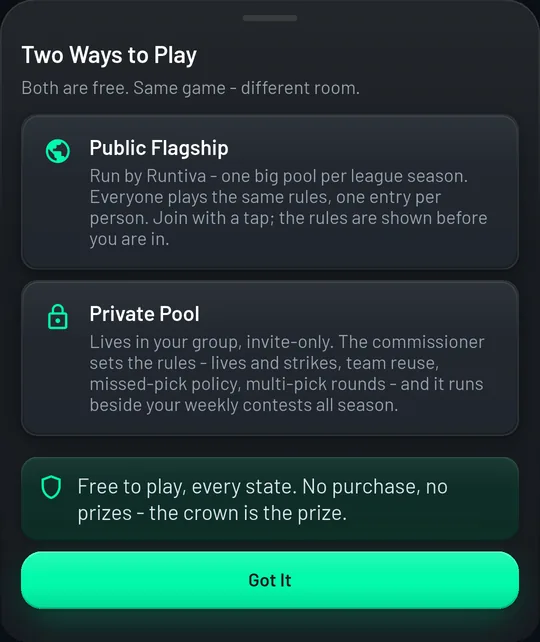
Runtiva survivor pools are free: no entry fee, no prizes, no purchase. The crown is the prize. Pools live inside a group run by a friend, a coworker, or a family member, the commissioner, who chose the rules before you joined. Everything else is automatic: rounds open on the real schedule, picks lock when games start, results are graded from the official score, and the standings and group chat update themselves.
Join a pool
- 1
Install Runtiva and sign up. Your age and location are verified once, at signup.
- 2
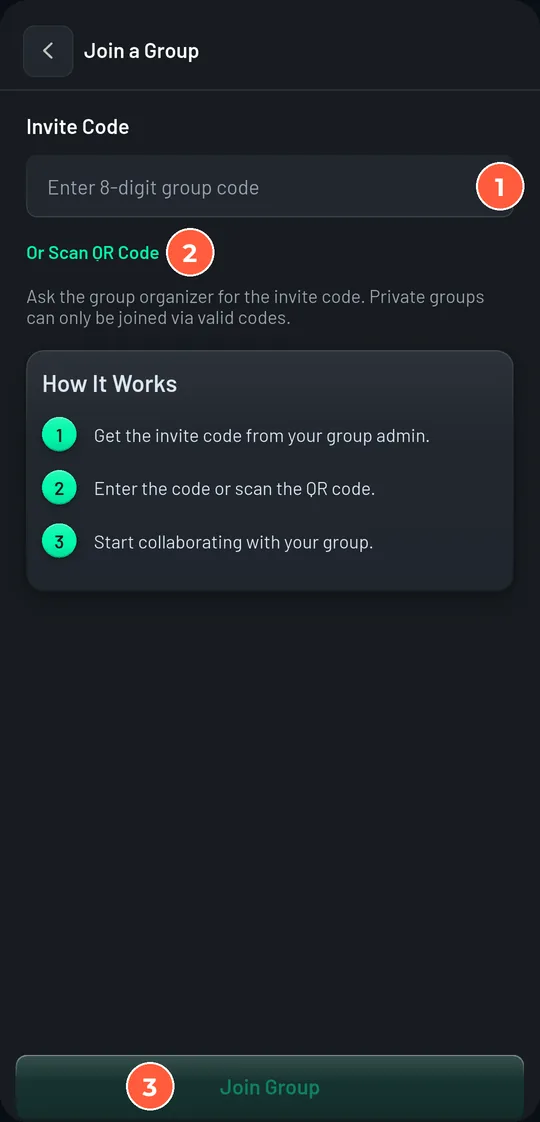
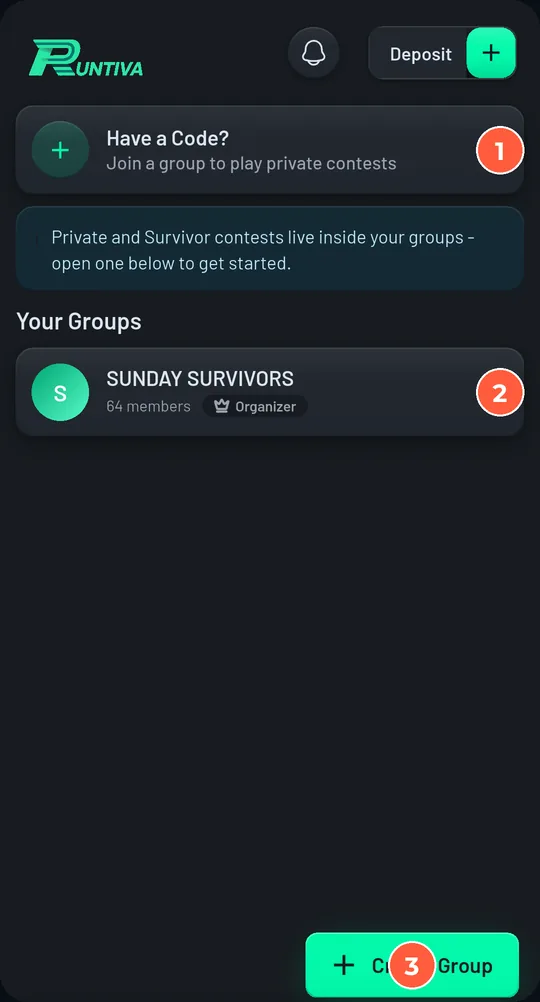
Tap the invite link, or open the Groups tab, tap Have a Code?, and type the 8-character code. Scanning the QR does the same.
- 3
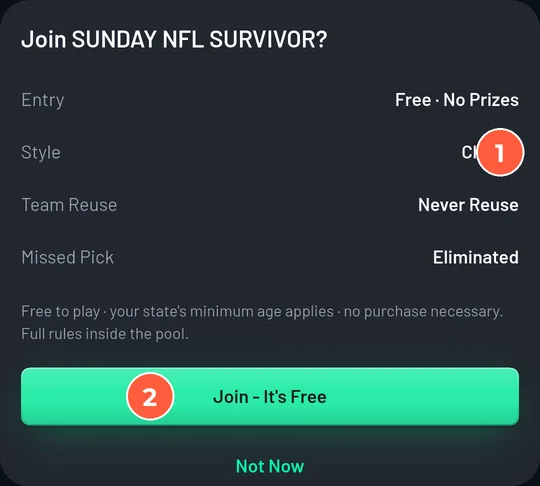
The pool is offered right away. Read the rule rows (style, team reuse, missed pick) and tap Join, It's Free. Not now? You can join later from the group's Contests tab, until the first round locks.
If the app says you can't join
| Message | Why | What to do |
|---|---|---|
| Joining Has Closed | The pool's first round has locked. | Join the group anyway. You can follow the pool, see every pick once games start, and join the chat. |
| This Pool Is for Group Members | You are not in the group yet. | Join the group with the code or link first. The pool comes with it. |
| You're Already in This Pool | One entry per person, and you have it. | Open the pool and make your pick. |
| That's All Your Entries | You hold every entry the pool allows one person. | Nothing to do. Play the entries you have. |
| Survivor Isn't Available Where You Are | Your current location is outside the areas where survivor can be played. | Your invite still works if that changes. |
Joining Has Closed
The pool's first round has locked.
Join the group anyway. You can follow the pool, see every pick once games start, and join the chat.
This Pool Is for Group Members
You are not in the group yet.
Join the group with the code or link first. The pool comes with it.
You're Already in This Pool
One entry per person, and you have it.
Open the pool and make your pick.
That's All Your Entries
You hold every entry the pool allows one person.
Nothing to do. Play the entries you have.
Survivor Isn't Available Where You Are
Your current location is outside the areas where survivor can be played.
Your invite still works if that changes.
Make your pick
- 1
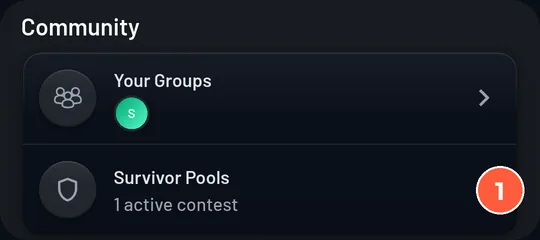
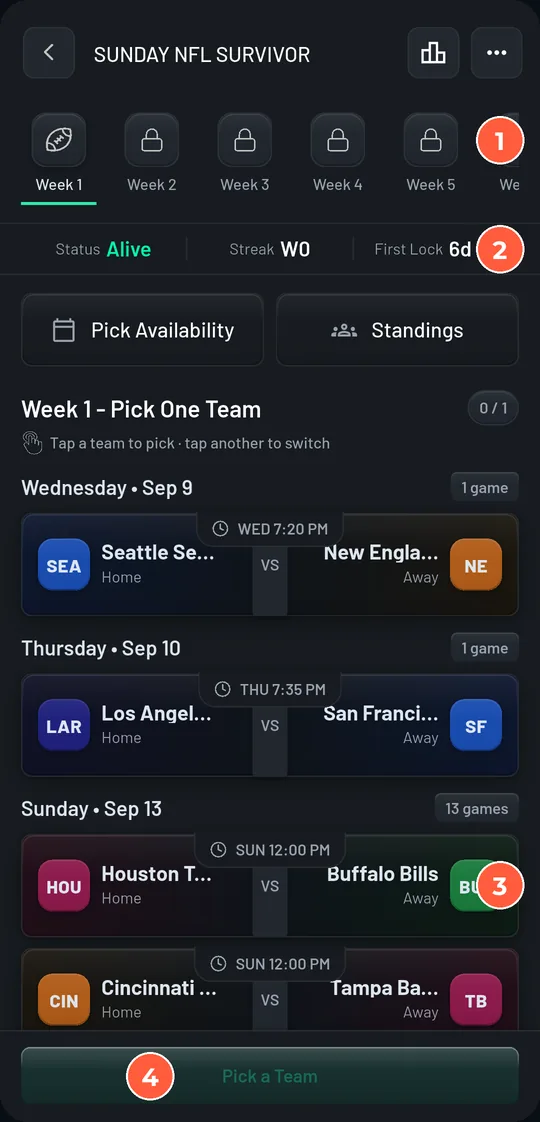
Open the pool from the group's Contests tab, from Home (Survivor Pools), or from the Make your pick button on the chat card. The current round is selected in the rail across the top.
- 2
Read the strip under the rail: your Status, your Streak, and when the round's first game locks. Below it, the round's games are listed by day with kickoff times.
- 3
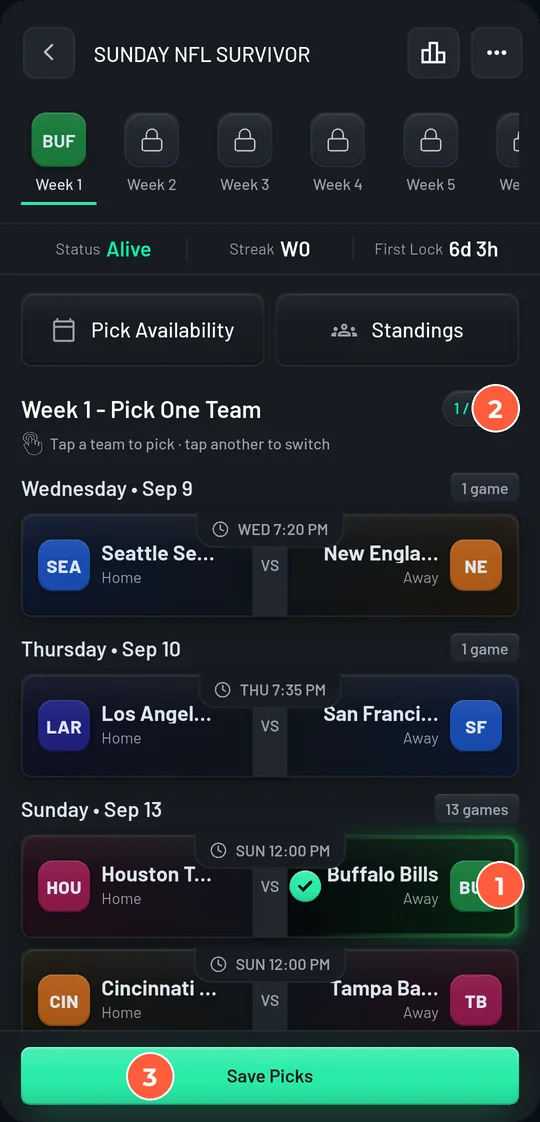
Tap a team. Tap a different team to switch. Then tap Save Picks.
- 4
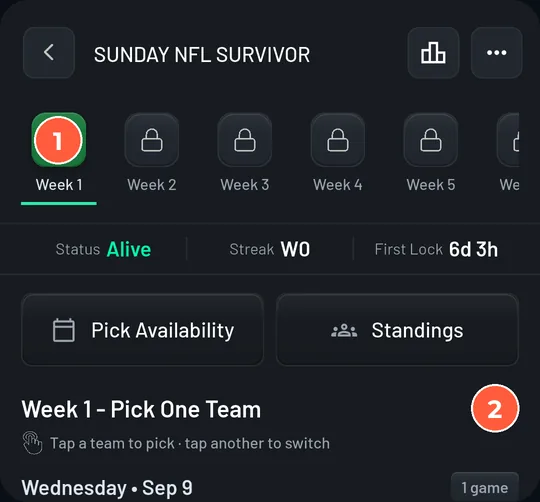
Change your mind any time before that team's game kicks off: tap another team and save again. Once the game starts, the pick is final.
The three things that end seasons
The early game
Each pick locks when its own game starts, not when the round closes. A Thursday or Wednesday game locks days before Sunday. If you pick it, you are locked in early.
Forgetting
Most pools eliminate a missed pick. The app reminds you 48, 24, and 3 hours before the round closes (12 and 3 hours for daily sports). Turn notifications on.
Multi-pick weeks
Some pools have weeks that need 2, 3, or 4 different teams. The heading says how many. Every one of them has to win.
Plan the season with Pick Availability
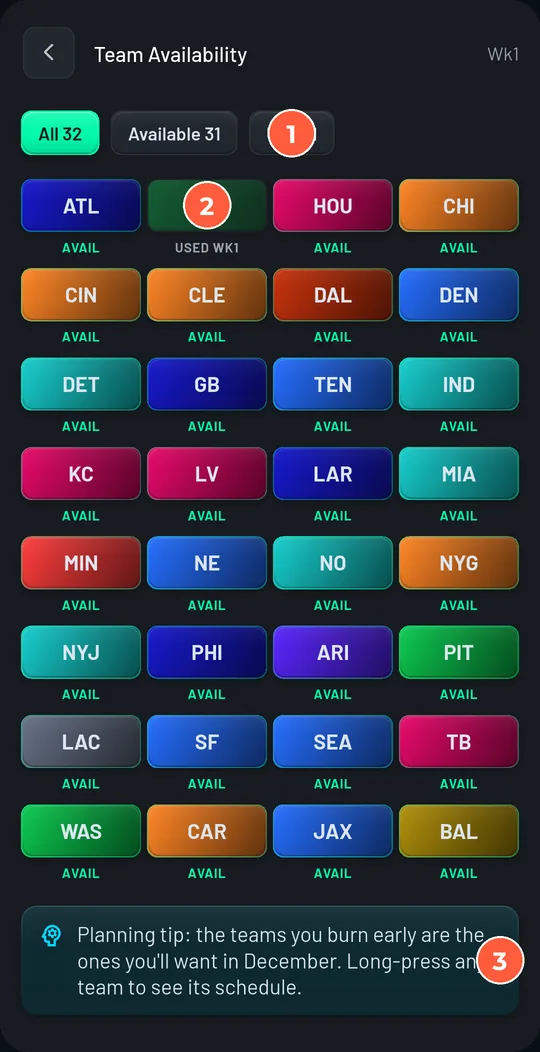
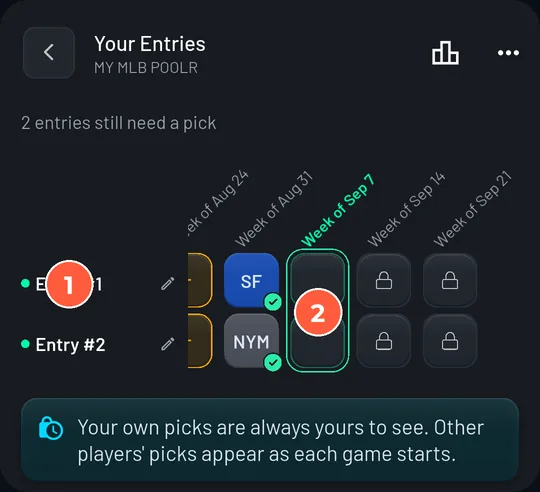
More than one entry
If your commissioner allows it, you can hold several entries: the pool opens on a grid of your entries by round, with an Add Entry button. Each entry is its own game: its own used teams, its own strikes, its own streak. Tap an entry to pick for it, or pick for all of them and Save All Picks.
Read the standings
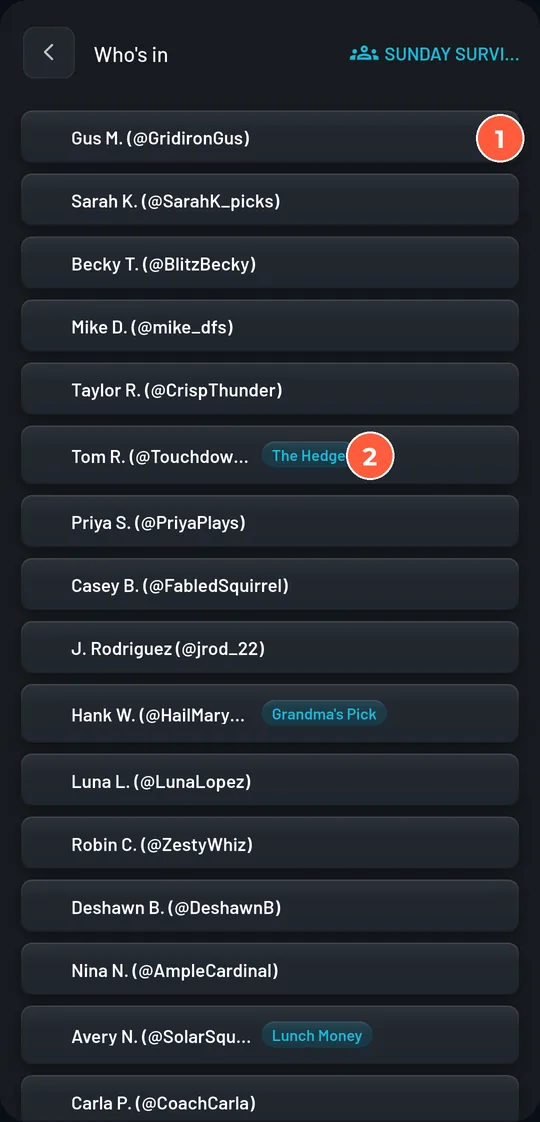
- 1
Tap Standings in the pool. Before the first round locks it is called Who's in and simply lists every entry.
- 2
Once the season is under way the top shows how many alive entries have picked this round, then the counts: still alive, fell, rounds left.
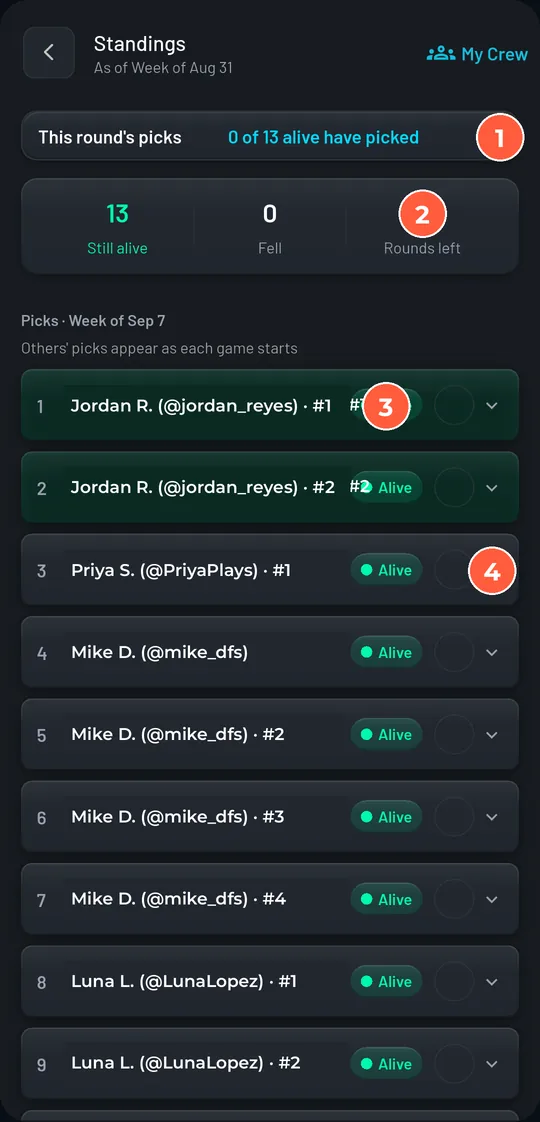
- 3
Each row is one entry: rank, name (or entry name), status chip, and this round's pick once its game has started. Tap a row to expand its full pick history with scores.
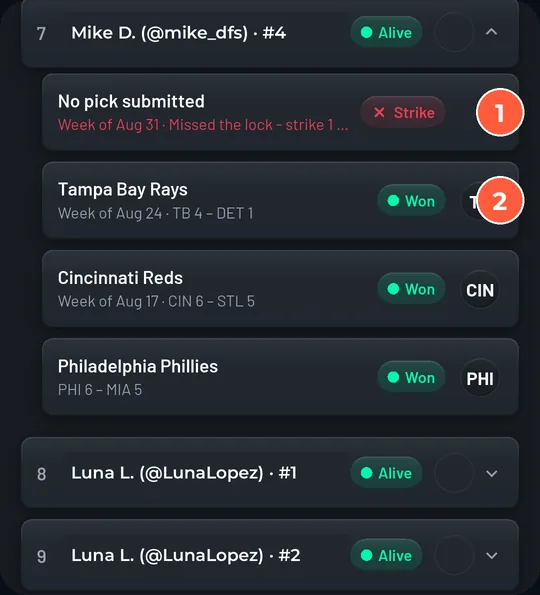
| Status | Meaning |
|---|---|
| Alive | Still in. The rank is by how far the entry has survived. |
| Revived | Was out and the commissioner brought it back. One more wrong pick and it is out for good. |
| Out round 5 | Eliminated in that round. The entry keeps read access to everything. |
| Withdrew | Left the pool before it started. Not an elimination. |
| Won | A champion. Everyone alive after the final round gets this. |
Alive
Still in. The rank is by how far the entry has survived.
Revived
Was out and the commissioner brought it back. One more wrong pick and it is out for good.
Out round 5
Eliminated in that round. The entry keeps read access to everything.
Withdrew
Left the pool before it started. Not an elimination.
Won
A champion. Everyone alive after the final round gets this.
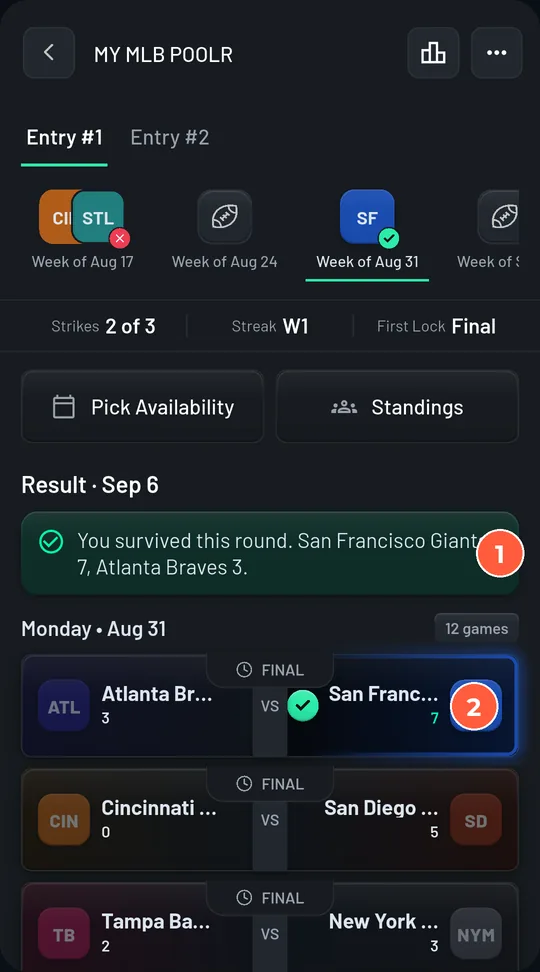
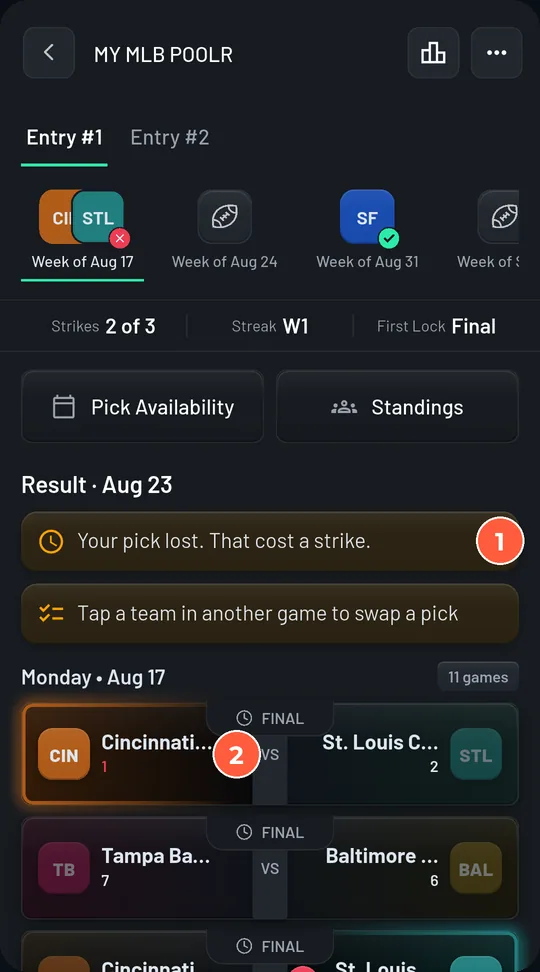
Your own round result
Rules that change from pool to pool
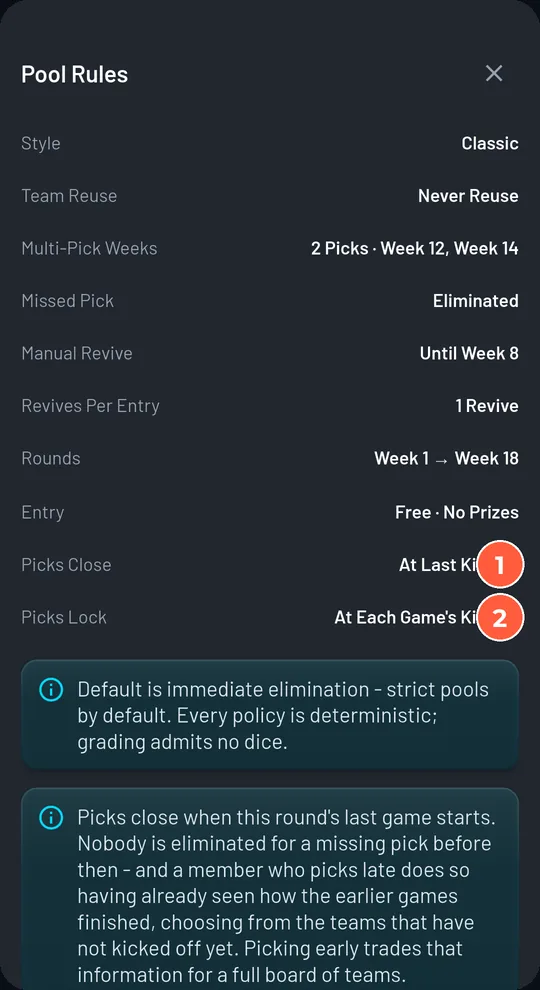
| Rule | What to look for | Why it matters |
|---|---|---|
| Style | Classic (one life) or Strikes (1 to 3) | With strikes you can survive a wrong pick. Without, one loss ends your run. |
| Strikes valid through | A round number, or All Season | After that round strikes stop working: sudden death. |
| Team reuse | Never, free after 4 rounds, or unlimited | Never means every team is a one-time resource. Plan ahead. |
| Missed pick | Eliminated, pick the favourite, random, reuse last | Eliminated is the default. Do not rely on the app to pick for you. |
| Picks close | At last kickoff or at first kickoff | Either way each pick locks at its own game. This only decides when a missing pick is punished. |
| Multi-pick weeks | Listed weeks and how many teams | You need that many different teams, all winning. |
| Manual revive | Off, or open until a round, with revives per entry | If it is on and you go out, ask your commissioner. Revives are posted to the chat. |
| Entries per person | 1 to 5 | More than 1 means you can hedge with a second entry. |
| Playoffs | Included or not | In knockout rounds every team is pickable, even ones you have used. |
Style
Classic (one life) or Strikes (1 to 3)
With strikes you can survive a wrong pick. Without, one loss ends your run.
Strikes valid through
A round number, or All Season
After that round strikes stop working: sudden death.
Team reuse
Never, free after 4 rounds, or unlimited
Never means every team is a one-time resource. Plan ahead.
Missed pick
Eliminated, pick the favourite, random, reuse last
Eliminated is the default. Do not rely on the app to pick for you.
Picks close
At last kickoff or at first kickoff
Either way each pick locks at its own game. This only decides when a missing pick is punished.
Multi-pick weeks
Listed weeks and how many teams
You need that many different teams, all winning.
Manual revive
Off, or open until a round, with revives per entry
If it is on and you go out, ask your commissioner. Revives are posted to the chat.
Entries per person
1 to 5
More than 1 means you can hedge with a second entry.
Playoffs
Included or not
In knockout rounds every team is pickable, even ones you have used.
Rules that are the same in every pool
- Ties, postponements, and no-results are pushes. You advance, your streak is unchanged, and the team goes back into your available list.
- A loss breaks your streak even when a strike absorbs it.
- If everyone alive loses the same round, the round is void. Nobody goes out and no strike is charged, unless the commissioner chose to end the season on a wipeout.
- The last player standing cannot be eliminated. The remaining rounds are a victory lap.
- Everyone alive after the final round is a champion. There is no tiebreaker.
- The official result is final. If a result is corrected, the pool is regraded and the chat says so.
Your entry: name it, hide it, or withdraw
- 1
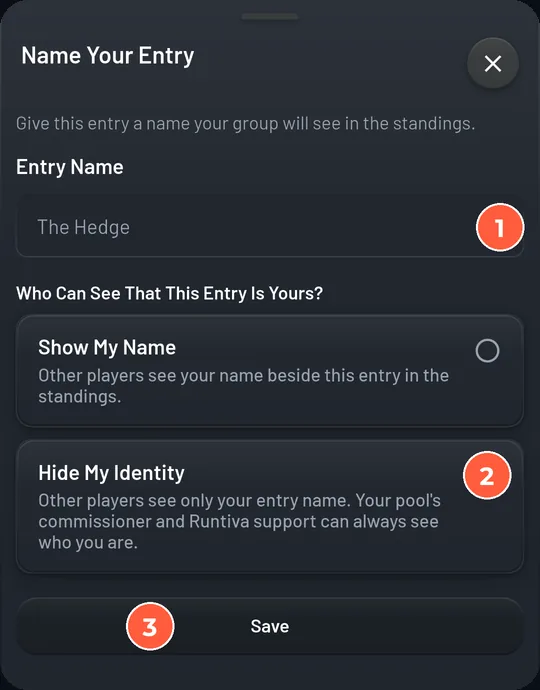
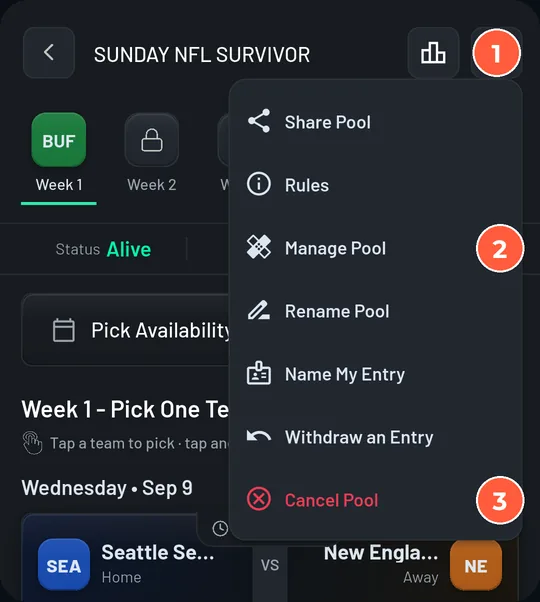
Name My Entry gives your entry a 2 to 20 character name that shows in the standings. Choose Show My Name or Hide My Identity. Hidden means other players see only the entry name; the commissioner and Runtiva support can always see who you are.
- 2
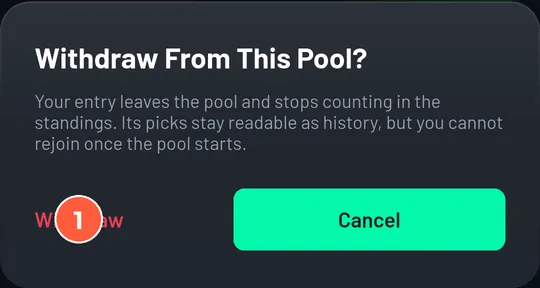
Withdraw an Entry leaves the pool before it starts. Your entry stops counting, its picks stay readable as history, and you cannot rejoin once the pool has started. After the first lock there is no withdraw; an entry you stop picking for simply falls.
- 3
Rules opens the frozen rules sheet. Share Pool opens the group invite so you can bring friends in before entry closes.
Notifications and the chat
- Pick reminders 48, 24, and 3 hours before the round closes (12 and 3 hours for daily sports), only while you have not picked.
- Round results: whether you survived, a strike, or an elimination.
- Revived by your commissioner, and champion at the end.
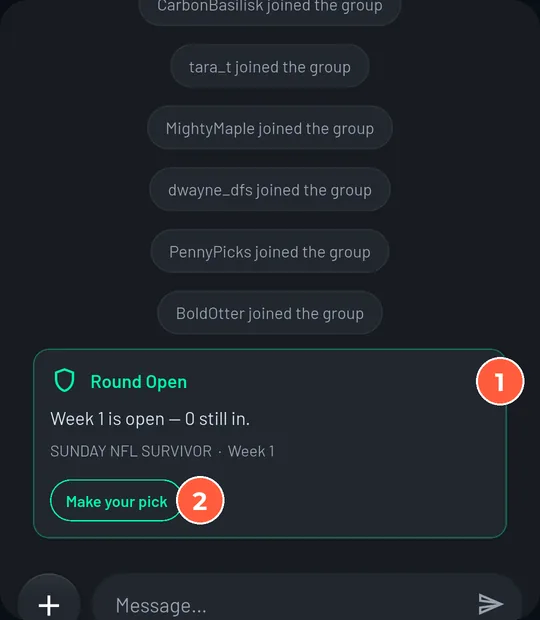
- Group chat cards for every round opening and locking, eliminations, revives, corrections, and the champion. The Round Open card has a Make your pick button.
If you are eliminated
You stay in the group and the chat, you can see every pick as games start, and you can follow the standings to the end. If your pool has a revive window, your commissioner may bring you back; you will get a notification and a chat card if they do. Many groups also run weekly Runtiva contests beside the pool.
Strategy basics
Win probability
How likely your team is to win this round. The obvious pick is obvious for a reason.
Pick popularity
In a big pool, a team most people pick is worth less: if it loses, half the field goes with you, and if it wins you gained nothing on them. In a small pool, just take the safest team.
Future value
A team you use now is gone for the season. The strongest teams are worth more in the weeks they are the only safe pick.
- Save strong teams for when they are needed, but don't hoard. A team is only valuable if you are still alive to use it.
- Don't get cute early. Most seasons end on a clever pick in a week that did not need one.
- Pick early, then check back. A saved pick can be changed until kickoff. Lock in a sensible team when the round opens, and revisit after the injury news.
- Prefer late games when you can. With picks closing at last kickoff, a Sunday team leaves your options open longer than a Thursday team does.
- With multiple entries, split them. Two entries on the same team survive or die together. Different teams give you two chances.
- Read your pool's rules. Strikes, revives, and multi-pick weeks change what a safe pick is. Ten seconds on the Rules sheet, once.
Mistakes that end seasons
- Missing a pick. The app reminds you; it does not pick for you unless the pool says so.
- Picking a Thursday team and then wanting to switch on Sunday. It locked on Thursday.
- Forgetting a team is used. The app will not let you pick it, but it can leave you with a bad slate late in the season.
- Assuming a tie is a loss. It is a push, and you get the team back.
- Not knowing the pool has multi-pick weeks. The heading says how many teams. Every one has to win.
Player FAQ
Does it cost anything?+
No. Runtiva survivor pools are free, with no prizes, wherever Runtiva is available. Your state's minimum age applies.
When does my pick lock?+
When that team's game starts. A Thursday game locks on Thursday even if the round runs through Monday.
Can I change my pick?+
Yes, until that game kicks off. Tap another team and save again.
What if I forget?+
Your pool's missed-pick rule applies when the round closes. In most pools that means elimination. Turn notifications on.
What happens on a tie or a postponed game?+
A push: you advance, your streak is unchanged, and the team goes back into your list.
Can others see my pick?+
Only once its game has started. Until then it is yours alone.
I joined the group. Why am I not in the pool?+
Joining the group is separate from entering the pool. Open the group, tap the pool, and tap Join This Pool before the first round locks.
Can I join after the season starts?+
No. Entry closes when the starting round locks. You can still follow the pool and join the chat.
Can I be revived?+
Only if your pool has a revive window and your commissioner chooses to. It is posted to the chat with their name on it.
Can I have more than one entry?+
If the commissioner allowed it. Each entry is independent.
Who wins if two people are left at the end?+
Both. Everyone alive after the final round is a champion.
Can I leave a pool?+
Before the first round locks, yes: Pool Actions, then Withdraw an Entry. After that, entries play out.
Glossary
- Round
- One set of games that counts together: an NFL week, an MLB week or game-day block, a cricket match day or fixture cycle.
- Lock
- The moment a pick can no longer be changed: when that team's game starts.
- Entry
- One run through the pool. You may hold several if the pool allows it.
- Strike
- A wrong pick absorbed instead of eliminating you. Only in Strikes-style pools.
- Push
- A pick that neither wins nor loses: a tie, a postponement, or a no-result. You advance and get the team back.
- Revive
- Being restored after elimination by the commissioner, inside the pool's revive window.
- Multi-pick week
- A round that needs 2, 3, or 4 different teams, all of which must win.
- Streak
- Consecutive winning rounds. A loss breaks it even when a strike absorbs it.
- Commissioner
- The owner of the group your pool lives in. Sets the rules, can revive entries, can end the pool.
- Who's in
- The standings before the first round locks: a list of every entry.
- Flagship pool
- Runtiva's public pool for a whole league season. One entry per person, no revives.
Ready to play?
Survivor pools are free in the Runtiva app. Read the Commissioner Guide too.